

Shining 3D Scanners
Handheld 3D Scanners

3D Scanners made For use on the Go
The Einstar and Einscan line of handheld 3D scanners are made for both indoor and outdoor use, with wireless configurations available so you can take your tools where the work takes you.
Full Color and Texture
With the ability to scan for color as well as texture, these scanners are versatile, whether you're looking to reverse engineer parts or digitize art and artifacts.


Reliability where it matters
Trusted to deliver the results you need quickly and easily.

Hot Swap Batteries
Rechargeable batteries provide ready to go power when and where you need it.

Indoor and Outdoor Use
Suitable for indoor use or outdoor use up to 110,000 lux.
Ready to use solution for:
Automotive
Packaging
Art, artifacts, and architecture
Reverse Engineering

Which 3D scanner is right for you?
Feature

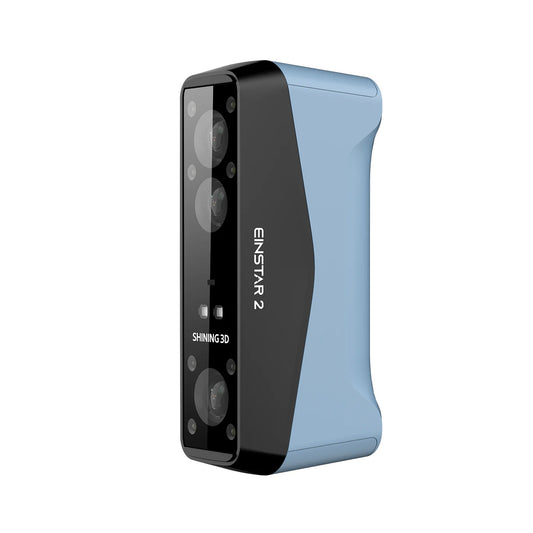
Einstar 2

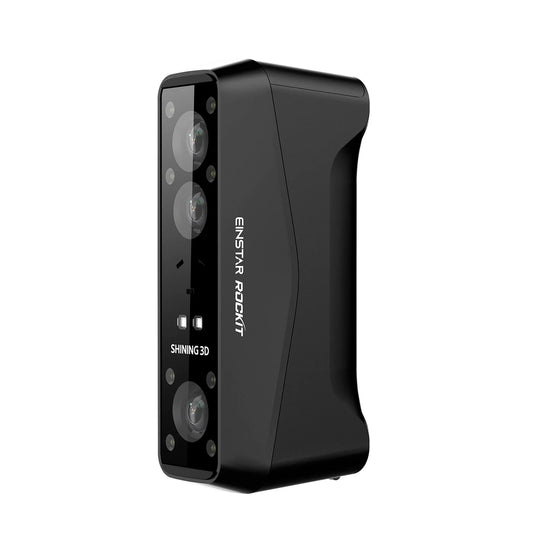
Einscan RockIt
Einscan Rigil
Light Source
17 parallel laser lines
IR VCSEL
19x19 crossed laser lines
7 parallel laser lines
IR VCSEL
25x25 crossed laser lines
7 parallel laser lines
Infrared VCSEL
Speed
Laser Mode: 2,500,000 points/second
IR Mode: 4,800,000 points/second
IR Mode: 4,800,000 points/second
Laser Mode: 2,800,000 points/second
IR Mode: 4,800,000 points/second
Laser Mode 25x25: 4,800,000 points/second
Laser Mode 7x7: 1,480,000/second
IR Rapid: 1,600,000 points/second
Standalone Mode

Wireless operation but must be synced to computer over wifi or wired connection
Wireless operation but must be synced to computer over wifi or wired connection

Can be used in standalone mode, or with wired connection or wireless connection
Touchscreen
None
None
Color touchscreen interface
Camera Resolution
3D: 2MP*2
Texture: 2.3 MP
3D: 2MP*2
Texture: 5MP
3D:2.3MP*2 1.3MP*2
Texture:5MP
PC Requirements
MacOS Tahoe 26.2 and above
Windows 10/11 64-bit
Windows 10/11 64-bit
MacOS Tahoe 26.2 and above
Windows 10/11 64-bit
Windows 11 Pro
Learn More

Frequently Asked Questions
What file formats do the scanners produce?
STL, OBJ, PLY, 3MF, and ASC files.
Can I use this wirelessly?
The Rigil, RockIt, and Einstar 2 can all be used wirelessly. However, the RockIt and Einstar2 need to be synced to a computer, whereas the Rigil can be used completely as a standalone device.
Do I need markers for alignment?
That depends on the scanner, scan mode, and what you're looking to scan:
The Rigil:
- Laser HD:Global Markers / Markers / Features
- IR Rapid:Global Markers / Markers / Features / Texture / Hybrid
The RockIt:
- Laser HD: Global Marker/Markers/Features
- IR Rapid: Global Markers/Markers/Features/Texture/Hybrid
The Einstar2:
- Laser HD: Global Marker/Markers
- IR Rapid: Global Markers/Markers/Features/Texture/Hybrid
Do I need any other software?
The scanners will produce STL files without additional software. However, if you want to reverse engineer to a STEP file you will want to use a reverse engineering software, like Shining3D's ExModel or Geomagic DesignX.
Can I use this with my 3D printer?
Yes. 3D scanning pairs well with 3D printing to help you create custom parts that meet your needs, whether it's an add on for your car, a custom insert for a tool, or wanting to save family artwork digitally.
